QRious, QR Code generation for OpenTX / EdgeTx
➡️ See this page on github





Your drone / plane gone down in a field and it's hard to find?
Just scan the QR, open maps, walk right to it!

Three ways to use it
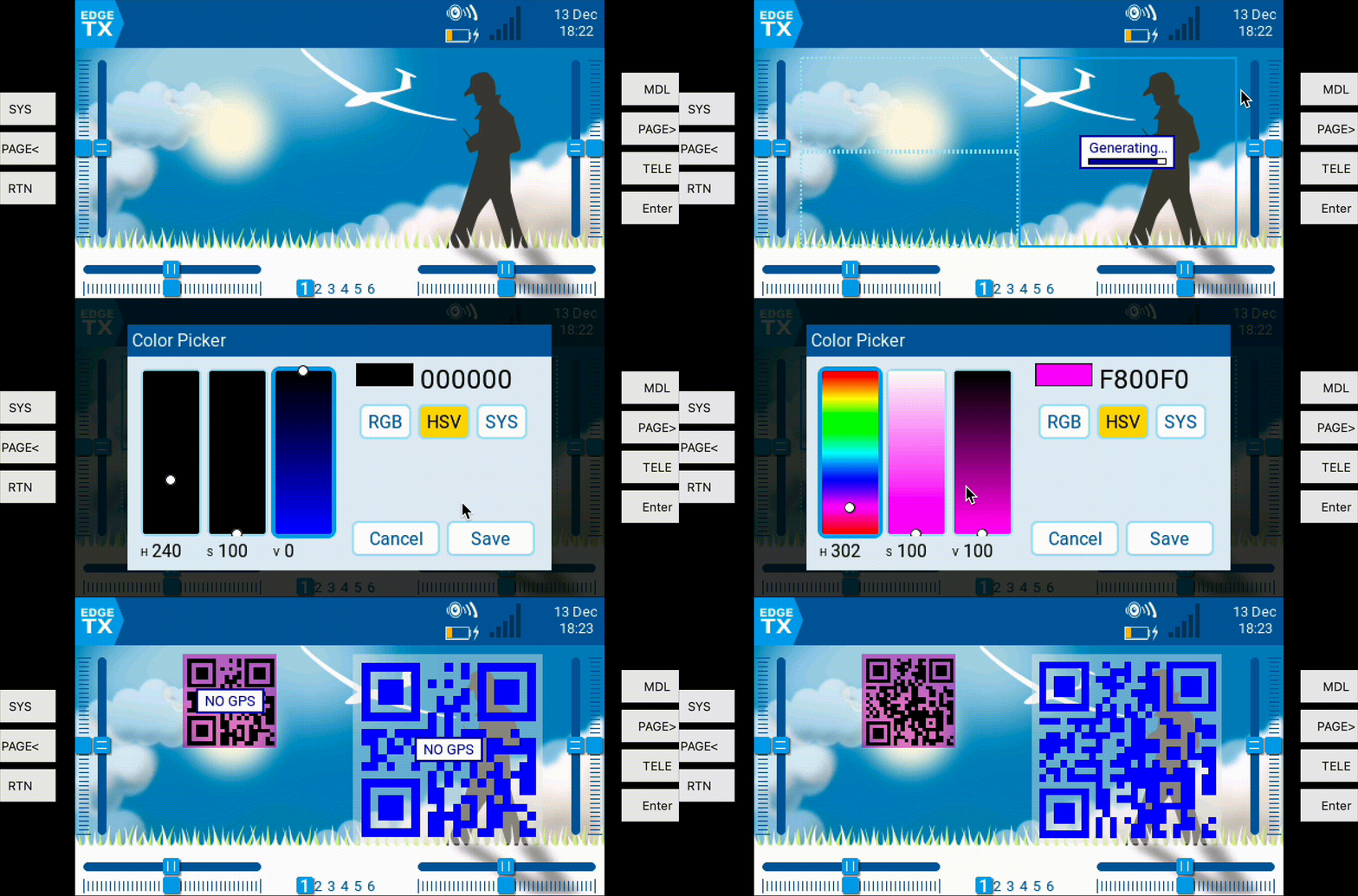
- Widget (on color screen radios like the TX16X)
- Highly customizable! Colors, transparency, update rate, link type.
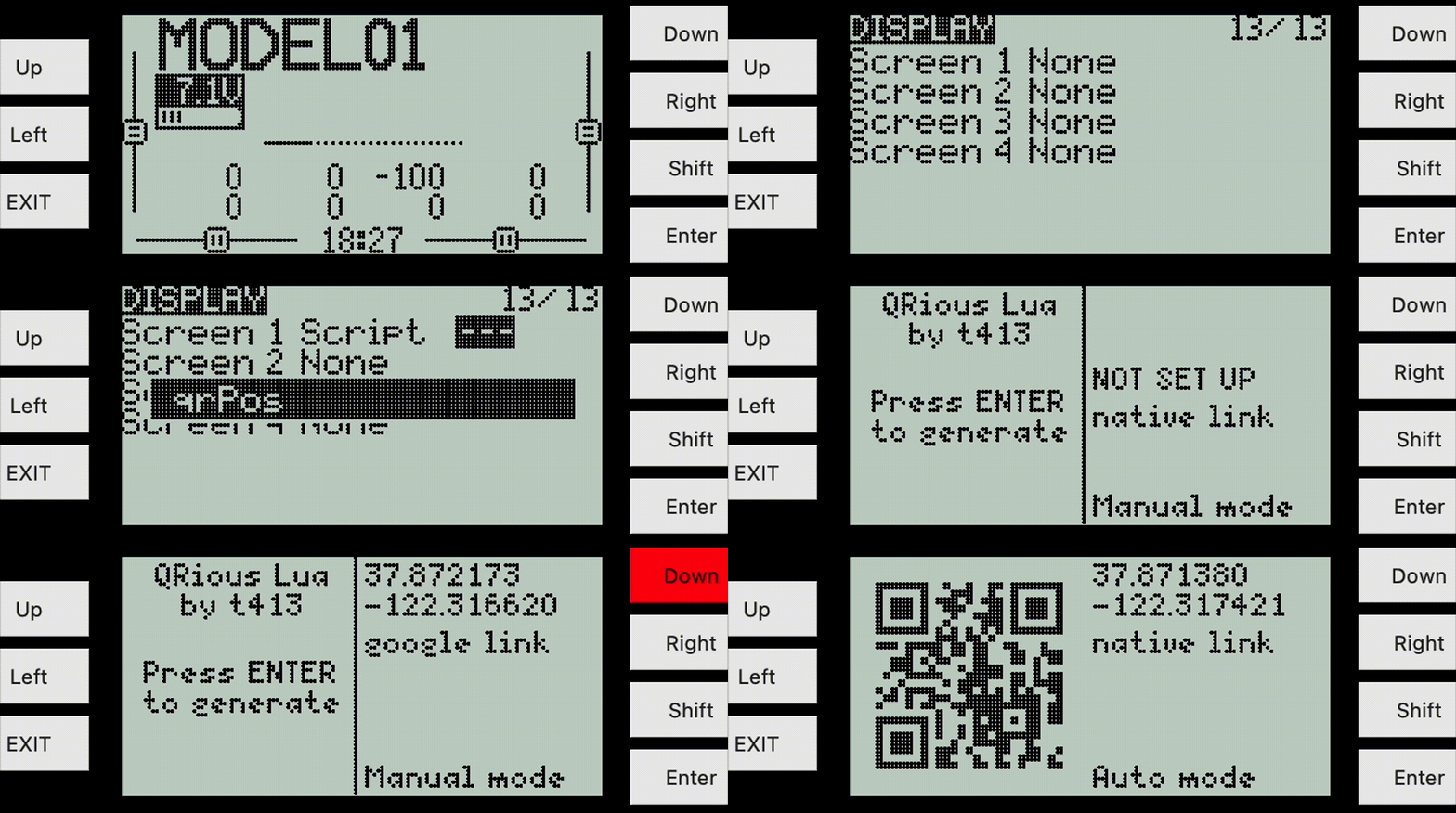
- Telemetry page (on b/w radios like the X-Lite)
- Can run alongside BF/iNav/Ardu scripts. Meticulously developed for low memory usage.
- gets GPS updates in the background, renders QR code when needed
- System Tool (not the recommended use-case, requires telem link when opened)
Features
- Quick and easy way to find your model.. use your phone!
- Works with your inbuilt telemetry data stream
- Built to support several different mapping methods:
- QR-code native
geo:data that opens in your phone's native map app - google specific link for opening in google maps specifically
- CoMaps link for opening in the free open source CoMaps App for offline mapping
- GURU maps link for opening in Guru Maps for offline mapping
- Works from the command line (
lua qrPos.lua 'data') .. great for testing!
Join my Discord and say hi and talk shop!
Installation & Usage
Installs just like any other opentx/edgetx lua script! Just copy three files.
- Download the code (direct link to zip)
- Copy to SD Card for your EdgeTx/OpenTx radio
- Copy
SCRIPTS/TELEMETRY/qrPos.lua- with the same path - Copy
SCRIPTS/TOOLS/qrPos.lua- with the same path (will make it available in system->tools) - Copy
WIDGETS/qrPos/folder to sd-card- only needed for color screen radios
- Alternatively, for my fellow mac/linux terminal nerds:
- Copy with
rsync -av ~/Downloads/QRious-main/src/ /Volumes/DISK_IMG/(changing source and dest paths with tab-complete) - Add as a telemetry widget on your radio (model edit, last page)
Widget setup on color screen radio:
Telemetry-page set up on b/w radio
Widget Configuration / EdgeTx Version
On color display radios you can modify settings (see the gif!) Some features require EdgeTx 2.11+ (github)! - Dropdown picker for which link-type you'd like. (On old versions you'll just see a simple switch) - More options! Older versions are limited to 5. Transparency is the #6 option.
Key Technical Achievements
- Fully Reentrant Architecture: 800+ lines of QR generation split into 11 incremental stages that pause/resume across execution cycles without blocking radio telemetry
- CPU Load Monitoring: Each stage checks
getUsage()and yields at 40-80% thresholds to keep the radio responsive - Crazy-optimized for low memory:
- Bit-packed arrays for massive memory savings over Lua arrays
- Static lookups are stored as strings for big memory savings over Lua arrays
- Two ways of rendering!
- Full color / transparency BMP file creation! Allows Widgets to work with high-speed rendering they require. Also non-blocking reentrant code.
- Direct rendering for tool view or telemetry page on black and white radios. Also non-blocking and draws over multiple iterations.
- Works alongside other memory-hog scripts like the iNav script! Run both!
- Aggressive Memory Management: Clears buffers (
eccbuf,genpoly,framask) immediately after use with strategiccollectgarbage()calls for these RAM-constrained microcontrollers - Multi-Platform Testing: Runs on OpenTX/EdgeTX hardware, simulators, and command-line with ASCII QR output
Testing / Development
This is actually runable from lua on the command line!
Install a lua runtime like LuaJIT, here using homebrew on macOS:
brew install LuaJIT # or: sudo apt install luajit2
Run the script with a geo: link:
lua src/SCRIPTS/TELEMETRY/qrPos.lua "geo:37.87133,-122.31750"
This prints debug information about the generation process and the QR code as ASCII to the console. Example output of that command is in the screeshot above.